INSURANCE · Product engineering
One system for claims recovery, from signed client to invoice.
Recovering a fleet operator's accident losses from an at-fault insurer means state-specific rates and demand letters, fixed deadlines and persistent follow-up. Coderlytics led the engineering of a platform for a US claims-recovery firm that brings claims, demand letters, insurer follow-up, calls, payouts and QuickBooks invoicing into one system.
At a glance
| Product | A claims-recovery platform built for a US claims-recovery firm |
| What the firm does | Recovers accident losses for commercial fleet operators from at-fault insurers — loss of use, property damage, towing and diminished value |
| Who uses it | Recovery agents, managers, sales and administrators |
| Engagement | Client platform. Coderlytics led the architecture and engineering from the first commit, as technical lead within a small delivery team |
| Timeline | About ten months of continuous delivery so far, from November 2025 to September 2026 |
| Backend | .NET 8 and C#, ASP.NET Core, Entity Framework Core, Azure SQL, Hangfire |
| Web app | React 19 and TypeScript, Vite, TanStack Router and Query, Tailwind CSS and shadcn/ui, with an API client generated from the OpenAPI contract |
| Integrations | Google Workspace (Gmail), Twilio Voice, QuickBooks Online; Word, PDF and Excel generation |
| Hosting | Microsoft Azure — App Service for the API, Static Web Apps for the web app, Azure SQL and Blob Storage |
The problem
A commercial vehicle is hit by another driver. Nobody is hurt, but the vehicle is off the road for repairs, and every day it stands still is revenue its operator loses. That loss — together with the repair, the tow and the drop in the vehicle's value — is owed by the at-fault driver's insurer. Getting it paid is a job of its own, and it is the job our client does for fleet operators.
One recovery is a long chain of small, exact tasks. The loss has to be valued at the right daily rate for that state and that year. A demand letter has to reach the insurer in the form that state expects. The adjuster has to be chased — politely at first, then firmly — until there is an answer, and always before the state's time limit runs out. When the money arrives, it has to be split by category, the operator's share paid out and the firm's fee invoiced.
Running many recoveries at once ran into four walls:
- Rules that change by state and by year. Vehicle rates, driver wages, limitation periods and the demand letter itself all depend on where and when the loss happened. General-purpose tools can store those rules; they cannot apply them consistently.
- Insurers who go quiet. A demand is only the start. Follow-ups depend on each agent remembering to send them, and the answer can land days later in one person's inbox.
- Money that moves three ways. Insurer payments arrive in parts and by category, part of each belongs to the client, and the firm's fee has to be invoiced in its accounting system.
- A calculation that lived outside the business system. Demand amounts came from an earlier standalone script — trusted, but outside any access control, audit trail or template history.
The brief was direct: one system of record where a claim carries its letters, e-mails, calls, payments and invoices — with the follow-up and the access rules built into the platform, not left to habit.
What the platform does
Every role works from the same claim record, narrowed to what that role is responsible for.
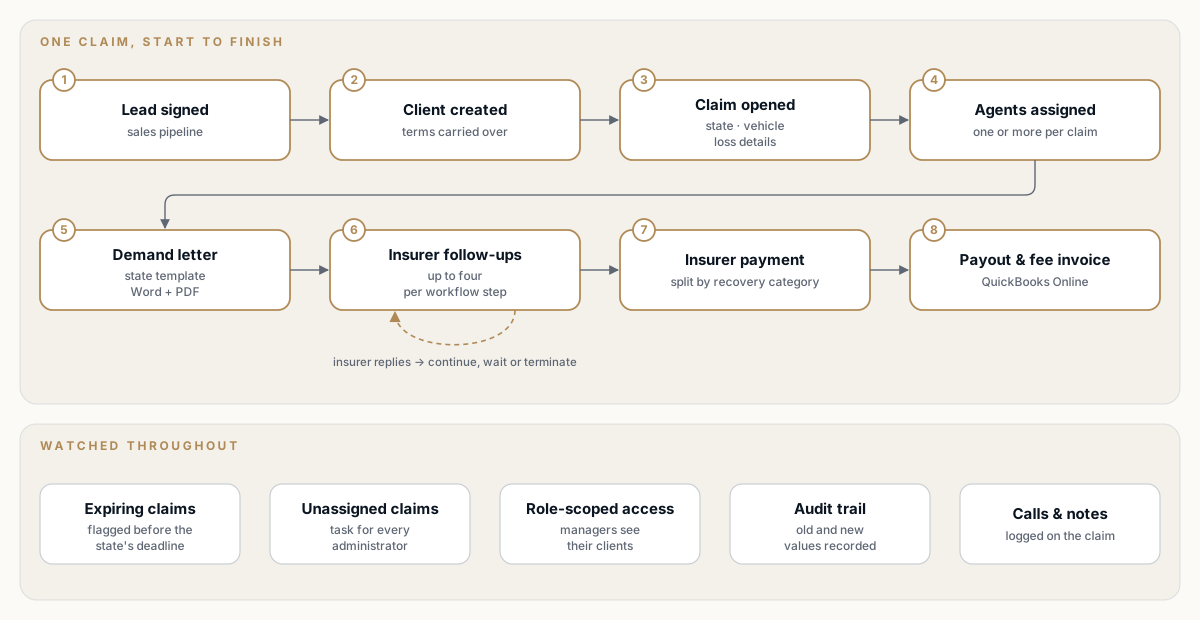
One claim, one record — from a signed client to the fee invoice. Select the diagram to open it full size.
| Role | Works on | What the platform does for them |
|---|---|---|
| Agent | Their assigned claims, by default | Demand letters, automated insurer follow-ups, calls, notes and tasks |
| Manager | The clients assigned to them — their claims, notes, documents, payments and invoices | Scope enforced by the API, down to the database query |
| Sales | Leads | Pipeline statuses, notes, tasks and one-step conversion to a client |
| Administrator | Everything, plus configuration | Rates, workflows, templates, users, QuickBooks and the audit trail |
For agents: the claim, the letter and the chasing in one place
The claim record holds everything a recovery needs: the date and state of the loss, the vehicle type, days off the road and repair hours, property damage, towing and previous payments, the adverse insurer with its claim number and adjuster, and whether a police report and a towing bill are on file. One or more agents can be assigned, and assignment immediately creates a "send demand letter" task.
- Demand letter in one step. The agent generates the state's letter from the claim, with the amounts calculated from that state's rates for the year of the loss, and previews it as Word or PDF. Every generated letter is recorded.
- Follow-ups that run themselves. Moving the claim into a workflow step starts the insurer follow-up sequence, sent from the agent's own mailbox. The claim screen shows how many follow-ups have gone out and when the next action is due.
- Calls from the claim. Agents with calling enabled call the adjuster or the client straight from the claim, in the browser. Calls are recorded and kept in the claim's call history.
- Notes that create work. A note records an outcome — a follow-up e-mail, a dispute, missing documents — and can create a dated task at the same time.
- Documents in the browser. Bulk upload and in-app preview of PDF, Word, text, images and Outlook and
.emle-mails, so correspondence never has to be downloaded to be read. - One task list. Overdue, upcoming and completed tasks in one view.
For managers: their clients, and nothing else
A manager is responsible for a set of clients. They see those clients' claims, notes, documents, payments and invoices, and the dashboard figures for them — and nothing that belongs to anyone else. The client list shows, per client, total and closed claims, money collected, money paid to the client and projected revenue, all filterable, sortable and exportable.
The practical payoff: a manager can put a client's figures on screen in a meeting with that client without worrying about what else might appear. How that is enforced is described under the engineering challenges below.
For sales: from first call to signed client without re-typing
Leads move through six pipeline statuses, from a cold lead to a signed customer. Notes capture outcomes such as a connected call, a booked meeting or a contract sent, tasks keep their assignment history, and documents stay with the lead. When a lead signs, one action converts it: the client is created with the agreed terms, the lead is marked as signed and its open tasks are closed.
For payments and invoicing: every recovery split, paid out and invoiced
- Insurer payments are recorded by category — property damage, loss of use, towing, diminished value, admin fee and miscellaneous — including partial and split payments.
- Client payouts can be created automatically when an insurer payment is entered; a configuration switch decides. Processing a payout generates its PDF and a "payment sent to client" task.
- Publish to QuickBooks. Selected payouts become one QuickBooks Online invoice, with a line per recovery category. If the platform cannot save its own record of the invoice, the invoice is removed from QuickBooks again, so the two systems do not drift apart. Invoices are previewed and downloaded without leaving the platform.
For administrators: the rules, the money and the risk on one screen
- The overview shows money collected, claims in progress, claims approaching their deadline and money still to collect — for the month, the year or all time — alongside upcoming, overdue and completed tasks.
- Claims close to their limit are flagged using each state's limitation period, so deadlines are visible before they are missed.
- Unassigned claims do not wait to be noticed. While a claim has no agent, a scheduled job gives every administrator a task to assign it.
- Record keeping. Changes saved through the data layer are recorded with their old and new values, and every sign-in and sign-out is logged.
- Reports cover claim and client payments and claim and client lists, and list views across the platform export to Excel.
- Configuration — vehicle rates and driver wages by state and year, workflows and their rules, demand-letter templates, statuses, task actions, feature flags, users and the QuickBooks connection — is managed from administration screens.
Why it is built this way
Five decisions shaped the platform. Each traded a little effort up front for less effort every time the business changed.
1. The rules are data, not code. Vehicle rates and driver wages by state and year, limitation periods, workflow steps with their rules and delays, demand-letter templates with their drafts and revisions, feature flags and settings all live in the database. Updating a year's rates or revising a state's letter is an administrator's task, not a release. The trade-off is real: adding a new rate year is still a small schema change, and every configuration screen is more software to own.
2. Work happens where people already work. Follow-ups go out from the agent's own Google Workspace mailbox, so an adjuster hears from a person, not a system. Calls start from the claim. QuickBooks Online remains the accounting system of record. The trade-off: three external connections to keep healthy — which is why they get their own section below.
3. The server decides what a manager sees. Hiding a menu item or defaulting a filter in the web app is a convenience, not a control. Manager scope is computed in the API and applied in the controllers, the services and the database queries, and it fails closed. The trade-off: the scope has to be threaded through every layer, and tests have to pin it there.
4. Keep the calculation the business already trusted. The demand calculation from the earlier script was ported with parity as an explicit rule rather than reinvented, and only then moved onto the rate tables. Existing rules are carried as they are until the business decides to change them — deliberately, and with the change visible.
5. Durable background work without extra infrastructure. Follow-up state is stored as rows in the same database and processed by scheduled jobs that run inside the API. There is one deployable unit and no message broker, every pending follow-up is a row that can be inspected, and a failed send is retried on the next run. The trade-off — work picked up on a schedule rather than instantly — suits a process measured in days.
How it works
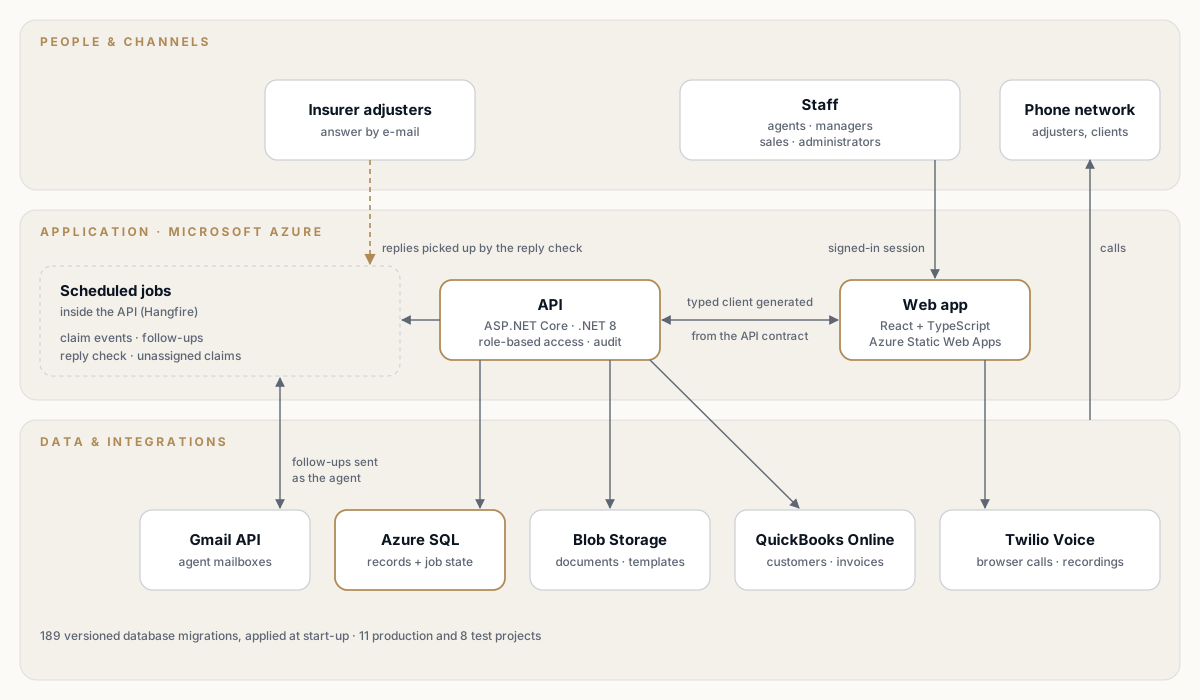
One API, one database, scheduled jobs in the same deployable unit and three business integrations. Select the diagram to open it full size.
Follow one claim through the system:
- Intake. A new claim starts in its pre-demand status with a generated claim number, and a client's first claim updates the client's status. While the claim has no agent, administrators receive a task to assign one.
- Assignment. One or more agents are assigned, and a "send demand letter" task is created for them.
- Demand. The amount is calculated from the state's rate tables for the year of the loss, merged into that state's published Word template and exported as Word or PDF. Every export is recorded.
- Workflow step. The claim enters a workflow step. The platform clears any pending follow-up events from the previous step before it records the new one, so nothing stale keeps running. Pre-demand claims cannot enter a workflow.
- Follow-up. Once the step's delay has passed, a scheduled job sends the first follow-up from the agent's mailbox to the adjuster and records the conversation. Later runs send up to three more, on the delays configured for that step.
- Answer. A reply check watches for the insurer's answer — a reply in the conversation the first follow-up started, or a new message titled with the insurer's claim number. An answer, or four follow-ups without one, applies the step's rule: Continue to the next step, Wait for the agent, or Terminate, which takes the claim out of the workflow.
- Money. The insurer's payment is recorded by category, the client's payout is processed and the fee is invoiced in QuickBooks Online.
The web app is a single-page React application served from Azure Static Web Apps. It talks to an ASP.NET Core API on Azure App Service, which also runs the scheduled jobs, with their state in the same Azure SQL database. Documents and templates are stored in Azure Blob Storage. Gmail and QuickBooks Online are called through their REST APIs directly, without vendor SDKs; calling uses the Twilio Voice SDK.
The backend is a layered .NET solution of 11 production projects — API, services, data access, migrations, jobs, shared constants, and one adapter each for Gmail, e-mail, invoicing, telephony and auditing — with 8 test projects alongside. The integration adapters sit at the edge, and all but one of them are independent of the rest of the solution. Excel export is a flag on the same list endpoint rather than a second API, and computed values such as the days left before a claim expires and projected revenue are translated into SQL, so they can be filtered, sorted and exported like any stored column.
The schema has evolved through 189 versioned Entity Framework migrations, applied when the API starts, plus idempotent SQL scripts for reference data and backfills, with a documented run order and a history table that records which scripts have been applied.
Engineering challenges we solved
Follow-ups that know when to stop
The risk with automated chasing is a system that keeps e-mailing an adjuster who has already answered, sends from an account that no longer exists, or loses its place when a claim moves on.
- A small, explicit model. A workflow is a set of ordered steps. Each step maps to a claim status, carries a Continue, Wait or Terminate rule, and has exactly four follow-up delays, validated whenever they are changed.
- Clean transitions. Every step change clears pending events before it records a new one, so a claim is never chased for a step it has already left.
- Three scheduled jobs, one responsibility each. One sends the first follow-up when the step's delay has passed, one sends the second to fourth, and one checks for replies.
- Safety built in. Every event has a retry budget, an event is closed if its agent no longer exists, and a suspended Workspace account is never used to send.
- Visible to the agent. The API exposes the last follow-up sent, the estimated time to the next action and whether the claim is waiting, and a waiting claim can be continued by hand.
- Testable in an afternoon. The length of a delay "day" is configuration, so a cadence that runs for a week in production can be verified end to end in a test environment in hours.
- Designed in iterations. The flow went through four versioned design diagrams in a few weeks before the rules settled — the last one routing every exit through the step's rule — and delays configurable per step and per follow-up were added as the process matured.
The result: chasing insurers is consistent, visible and stops by rule. It no longer depends on an agent's memory.
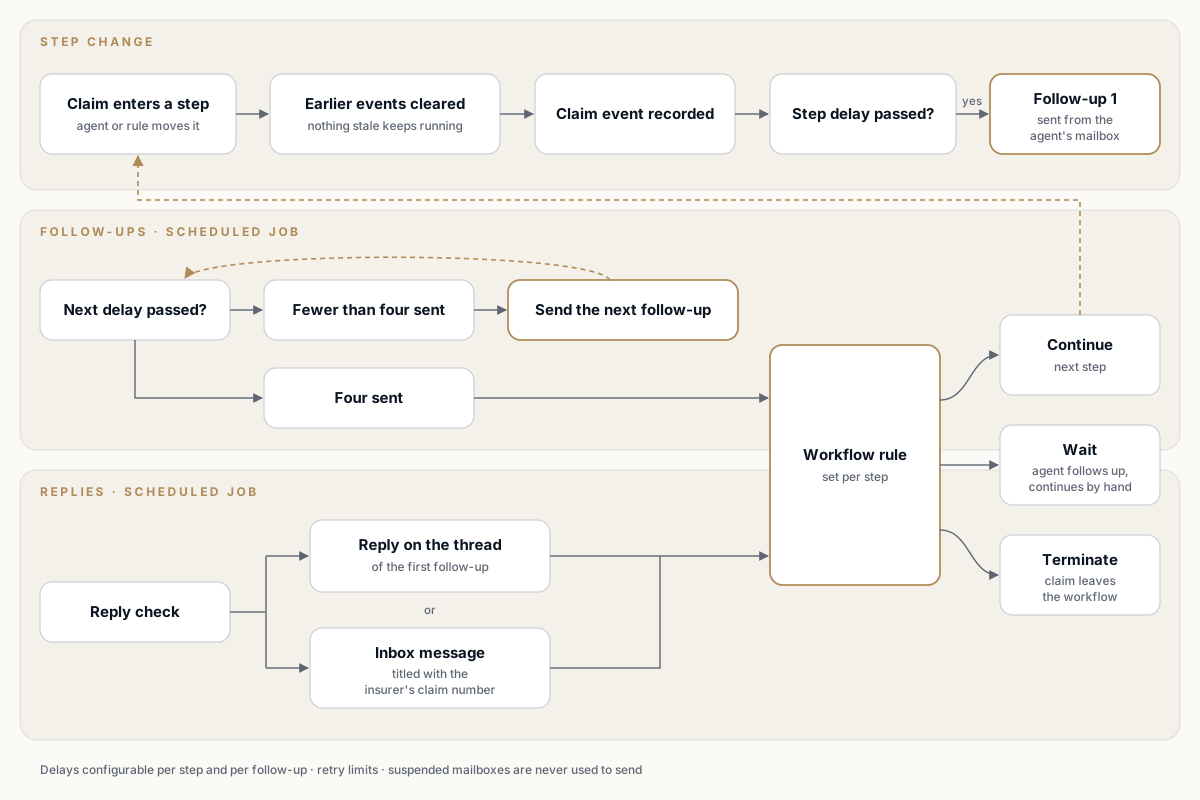
Three jobs, one decision. Every way out of a follow-up sequence goes through the rule configured for that step.
A trusted script turned into a governed feature
The risk in replacing a script everyone trusts is a rewrite that quietly changes the amounts demanded — or, once templates live in a shared system, two administrators overwriting each other's work.
- Parity first. The calculation was ported with matching the earlier script as an explicit rule, and only then were its hard-coded rates moved into tables by state and year.
- Word stays Word. Values are merged directly into the state's Word document, so letters look exactly as the firm designed them.
- Templates with a life cycle. Templates are stored in Blob Storage with drafts, immutable revisions and publishing. An administrator editing a draft holds a lease on it, and a save based on an outdated revision is rejected as a conflict instead of overwriting someone else's change.
- Editing in the browser. A Word editor inside the web app renews its lease every four minutes, saves the draft to the server five seconds after the last edit and keeps a local recovery copy in case the browser closes.
- A record of every letter. Each generated letter is logged in a history that administrators can review.
The result: a revised state letter is an edit, a review and a publish — and two administrators cannot overwrite each other's template.
Managers see their clients — and only their clients
The risk is a manager opening a claim, payment or invoice for a client they do not manage. There was a subtler one too: the web app's default "assigned to me" filter hid the claims of a manager's own agents, so a manager could miss claims they were responsible for.
- Compute once. The set of allowed clients comes from the manager's active client assignments. Administrators are unrestricted.
- Carry it everywhere. The set travels from the controller through the filter and the service to the database query — across 12 controllers, 16 services and 22 repositories. A request for a single record outside the set is refused, and the misleading "assigned to me" filter is cleared for managers.
- Fail closed. An empty set returns no rows, never everything.
- Delivered as one change. Scoping started with claims, then was extended to every layer in a single pull request of 233 files — 88 of them test files, carrying most of the new lines.
The result: a manager with no assigned clients sees an empty list — not the whole book.
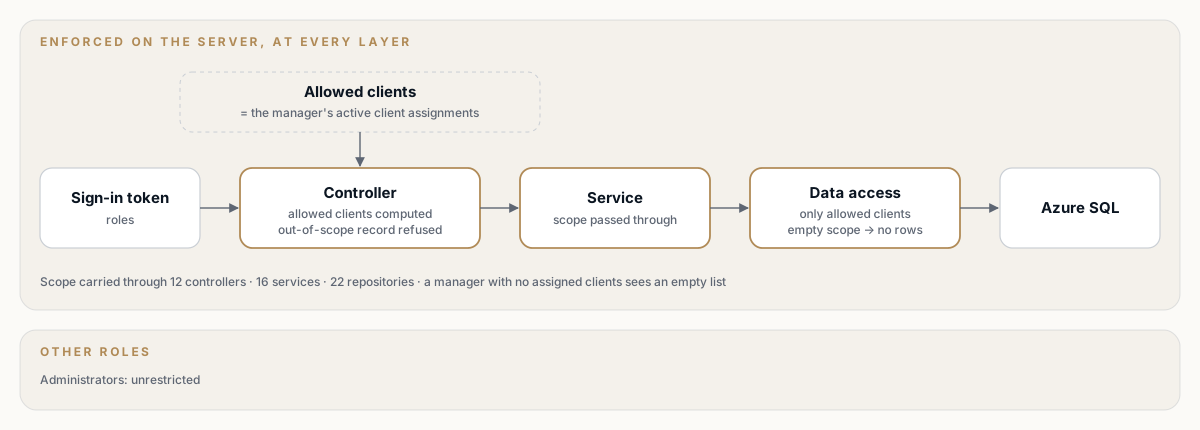
Scope is computed once and enforced at every layer. The web app never decides what a manager may see.
Keeping pace with a 669-operation API
The risk: a web app falling out of step with an API that changed almost daily — in its busiest month, the contract was updated 47 times.
- The API publishes an OpenAPI 3.1 document, which is committed to the web app's repository.
- A typed client with 669 request functions and 995 data hooks is generated from it, split by area, marked as generated and excluded from linting.
- The contract was updated in 137 commits, and 120 of them regenerated the client in the same change.
- The type check runs in every CI build, before anything is deployed.
The honest limit: drift is caught by the type check once the client has been regenerated. There is no separate contract comparison step in CI yet.
The result: a renamed field in the API breaks the build — not a screen in front of a user.
Lists that survive refresh, back and a pasted link
The risk: the claims list alone has about fifty filterable columns, plus tabs, status and paging, and detail pages have filterable tabs of their own. Views get lost on refresh, flicker while they load, or cannot be shared.
- Search parameters are validated with safe defaults, so a malformed or old link still opens a working view.
- "Canonical search" redirects give each list view one fully specified URL, and older URL shapes are migrated automatically.
- Route loaders prefetch exactly the query the page renders, and skeletons replace spinners.
- Paging, sorting and filtering happen on the server, and a tab's data is preloaded when the user hovers over it.
- 19 unit-tested canonical-search modules and a browser smoke test check that a filtered URL is restored exactly.
The result: "send me that list" is a link, and "send me that list in Excel" is a button.
Documents and e-mail files without downloads
The risk: claims work runs on PDFs, Word letters and Outlook e-mails, and heavy viewer libraries can make a back-office app slow for everyone.
- Viewers for PDF, Word,
.emland Outlook.msgfiles load only when a document is opened, each in its own bundle. - The Outlook reader depends on a text-encoding library written for servers; a small browser replacement makes it work with the web app's modern bundler.
- Bulk uploads and files of up to 200 MB are supported.
The result: agents read correspondence where the claim is, and users who never open a document never download the code to display one.
An audit trail that business code does not have to remember
The risk: gaps in the audit trail every time someone adds a table or forgets a logging call.
- A save interceptor records created, updated and deleted rows, with old and new values for only the columns that actually changed.
- Password and security fields are never written to the trail.
- Rows whose keys are generated by the database are completed after the save, so new records are audited with their real identifiers.
- Sign-ins and sign-outs are logged separately, and the interceptor is tested against a real SQL engine.
The result: a new table is audited from its first save through the data layer, without a single extra line of business code.
Integrations that stay connected
Gmail: follow-ups sent as the agent
- Follow-ups are sent from the assigned agent's own Google Workspace mailbox, so they arrive from a person the adjuster can reply to.
- Access tokens are cached and refreshed once if a call is rejected.
- Only the conversations the platform starts are tracked. There is no general inbox synchronization.
- An agent whose account has been suspended is never used as a sender.
Twilio: calling from the claim
- The API issues a short-lived, outbound-only calling token to the browser.
- A call is connected only when it is answered, and it is recorded. Status updates log the call against the claim and the agent.
- The web app runs a clear call-state machine — setting up, ready, ringing, active, ended — with mute and hang-up, and normalizes phone numbers to the countries the business allows.
- Call history is available per claim and across the platform.
QuickBooks Online: invoicing without leaving the platform
- The platform talks to QuickBooks through its REST API, without an SDK. Access is refreshed ahead of expiry and again if a call is rejected.
- "Reconnect required" and "service unavailable" states are shown in the web app instead of failing silently.
- Customers are synchronized from QuickBooks, and each client is explicitly linked to its QuickBooks customer.
- Missing service items are created automatically, and an invoice created in QuickBooks is removed again if the platform's own save fails.
The result: billing happens inside the platform, while QuickBooks remains the books.
How Coderlytics delivered it
The platform was built alongside a live business, in increments that each left the team with something it could use.
A small team with clear ownership. Coderlytics provided the technical lead and principal engineer from the first commit — the architecture, the backend and a growing share of the web app — working with a frontend lead who established the web app and an integrations engineer who delivered telephony, accounting and the e-mail workflows.
Foundations first, tested from the second commit. The first two days laid down users, roles, sign-in, clients, claims, documents, notes, statuses and payments. Tests arrived with the second commit and continuous integration on the third day. The web app started just over a week later, deployed automatically within days and had a preview environment for every pull request from the start.
Requirements that were expected to move. A back office for a live business does not stand still, and the architecture assumed it would not. Over ten months:
- demand-letter templates moved from files bundled with the code to governed drafts and revisions;
- the follow-up process went through four design iterations in a few weeks, then gained delays configurable per step and per follow-up;
- one agent per claim became several;
- manager access went from scoping on claims to scoping at every layer.
What kept change cheap was rules in tables, feature flags and settings, idempotent scripts and a generated client. A change of mind in month nine cost a migration and a regenerated client, not a rewrite.
Every change visible before it shipped. Every push to the web app's main branch updates a shared development environment, every pull request gets its own preview, and production is promoted deliberately. The backend runs separate development, test and production environments. From the spring of 2026, work moved through pull requests with squash merges, and review fixes are recorded in the history.
Tests written with the features. About three in four backend commits changed a test project. Continuous integration builds in Release mode and runs the full test suite with a coverage report on every push to main and every pull request into it. The web app runs strict TypeScript, linting, unit tests and a type-checked build before any deployment, and a lint check before every commit.
Decisions kept next to the code. Workflow designs are versioned as diagrams in the repository, SQL scripts have a documented run order, and a history table records which scripts have been applied.
| Milestone | What shipped |
|---|---|
| November 2025 | Layered .NET solution with tests from the second commit; users, roles and sign-in; clients, claims, documents, notes, statuses and payments; continuous integration from day three |
| December 2025 | Web app started, deploying automatically with a preview for every pull request; typed client generated from the API contract; split and client payments; expiring-claim indicator and first overview figures |
| January 2026 | Server-side paging, filtering and sorting on every list; state demand letters as Word and PDF; audit trail; tasks; Excel exports; claim and client workspaces, global search, dashboard and reports |
| February 2026 | Vehicle rates, driver wages and limitation periods in maintainable tables; claim financial fields; bulk document upload; production pipeline for the web app; web app unit tests |
| March 2026 | Revenue and recovery figures; tasks linked to notes; document categories; feature flags and settings; telephony in the API; browser smoke tests |
| April 2026 | Calling from the browser; demand-letter templates with drafts, publishing and an in-browser editor; leads pipeline; QuickBooks Online invoicing; pull requests with squash merges |
| May 2026 | QuickBooks customer sync; lead-to-client conversion; call history; user administration; automated insurer follow-ups with reply detection; background jobs moved into the API |
| June – September 2026 | Workflow rules, wait states and configurable follow-up delays; production e-mail and accounting configuration; several agents per claim; manager client scoping extended from claims to every layer; coverage summary in CI |
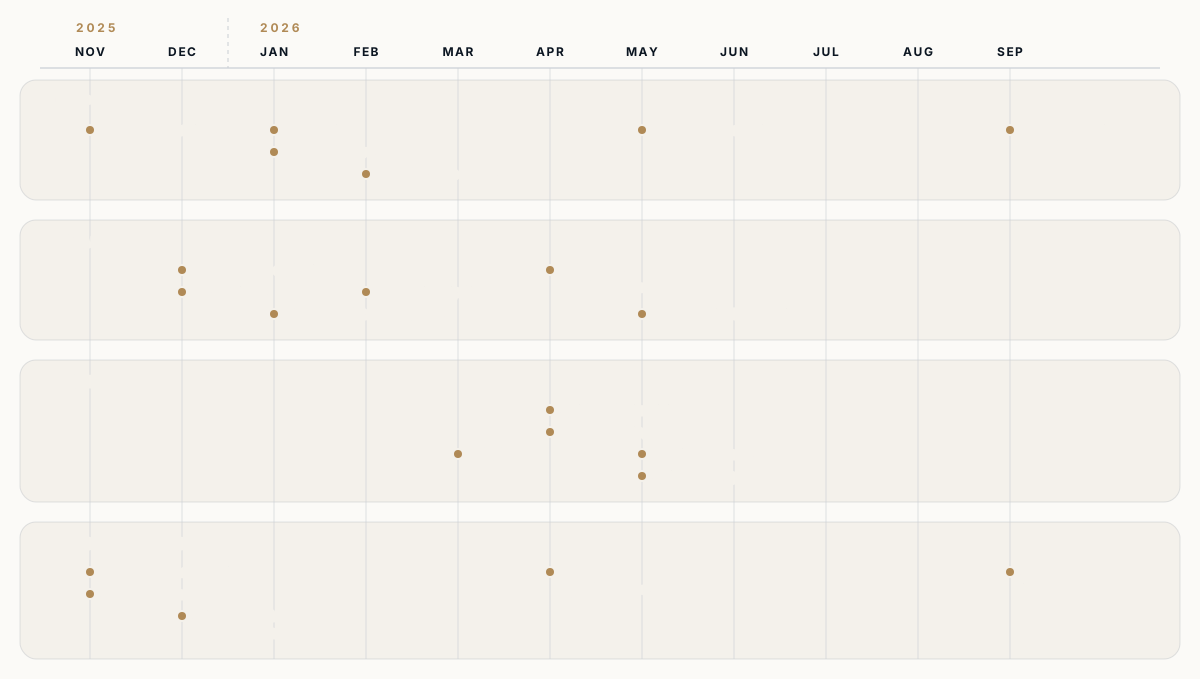
Ten months of increments, each leaving something the team could use. Select the diagram to open it full size.
By the numbers
| Continuous delivery so far | ~10 months |
| Automated backend test methods | 4,100+ |
| Web app unit test cases | 870+ |
| Backend commits that also changed tests | ~75% |
| HTTP API operations / generated data hooks | 669 / 995 |
| Updates to the shared API contract | 137 |
| Versioned database migrations | 189 |
| .NET projects, production / test | 11 / 8 |
| State-specific demand-letter templates | 30+ |
| Automated insurer follow-ups per workflow step | up to 4 |
| Scheduled background jobs | 4 |
Figures as of September 2026.
What comes next
The next steps build on the tables, jobs and contract already in place:
- Contract and browser checks in CI — comparing the generated client with the committed contract and running the browser smoke tests as pipeline steps, so drift and navigation regressions fail before review.
- Rate years without schema changes — moving yearly rates from columns to rows, so a new year is data entry from end to end.
- Reporting on the follow-up engine itself — which steps and follow-ups get insurers to answer, built on the events the platform already records.
What this shows
This platform is one firm's back office, but the approach carries to any business that runs on rules a generic CRM was never built for: turn the rules into data the business owns, automate the repetitive chasing while a person stays in charge of judgement, put access control where the data is rather than where the buttons are, build both sides against one generated contract, and deliver in increments that each leave something working while the requirements move.
If you are running a back office on spreadsheets, inboxes and a script that has outgrown its purpose — or on a platform that can no longer keep up with how your business works — talk to us.
Work with us
Planning a platform that has to be right on day one?
Tell us what you are building. We will come back with how we would architect, deliver, and operate it.
← Back to Work